
Picking the right accounting software really depends on your business and what you actually need. Xero is solid if you’re a growing small business and like things to be automated with lots of integrations. MYOB works better for established Australian businesses that have trickier payroll or compliance stuff. And QuickBooks? Honestly, QuickBooks works really well for freelancers or sole traders who just want something simple, affordable, and not too complicated.
Getting the right accounting software can totally change how you deal with your finances. It can save you a ton of time each week and make sure you’re keeping up with Australian tax rules. But yeah, with Xero, MYOB, and QuickBooks all vying for the top spot as cloud accounting platforms in Australia, it can feel a little overwhelming.
Quick Comparison of Big Three
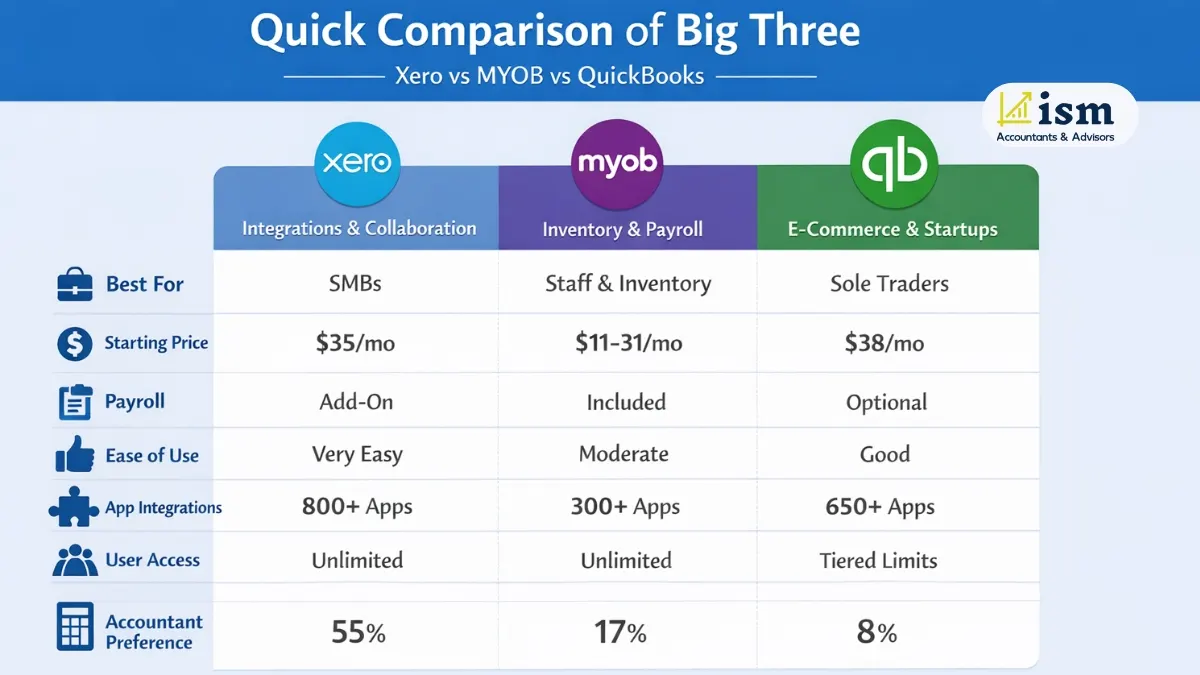
Xero is basically the market leader in Australia, holding over 60% share, and people love it for how easy it is to use plus the huge number of integrations.
MYOB has been around forever in Australia and really shines with inventory and payroll features, especially if you’ve got staff. QuickBooks is the cheapest way in and works well for e-commerce and smaller setups.
Xero vs MYOB vs QuickBooks Comparison Table
Feature | Xero | MYOB | QuickBooks |
Best For | Small-to-mid businesses prioritizing integrations & collaboration | Businesses with staff, complex inventory, or payroll needs | Sole traders, startups, and e-commerce businesses |
Starting Price | ~$35/month | ~$11/month (Solo) to $31/month | ~$38/month |
Payroll Included | Add-on available | Included in most plans | Add-on or included (plan-dependent) |
Ease of Use | Excellent – most intuitive | Moderate – steeper learning curve | Good – straightforward interface |
App Integrations | 800–1,000+ | 300+ | 650+ |
Mobile App | Highly rated | Functional | Excellent for on-the-go tasks |
User Access | Unlimited on most plans | Unlimited on Business plans | Tier-based limits |
Accountant Preference | ~55% | ~17% | ~8% |
So yeah, if you’re trying to pick between Xero vs MYOB vs QuickBooks, this table gives a good snapshot of what each does best and who it’s really for.
Recommended Read: Best Cloud Accountiing Software in Australia
What Is Xero?
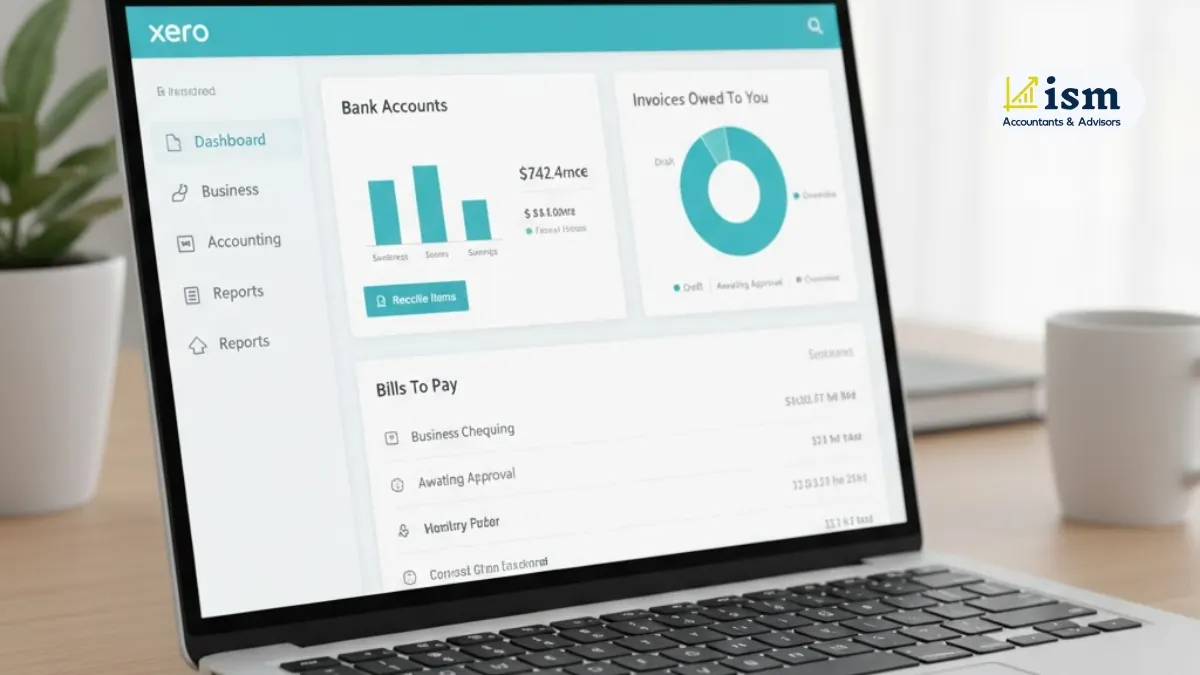
Xero is cloud-based accounting software that started in New Zealand back in 2006 and has really taken off in Australia. It runs entirely online, so you can check your financials anytime, anywhere, as long as you’ve got internet.
Core Strengths of Xero: Xero makes accounting a lot less scary for people who aren’t accountants, while still packing in useful tools for growing businesses. Some of the big wins:
- Super user-friendly interface – stuff like “spent” and “received” instead of confusing accounting terms.
- Cloud-based access, so owners, accountants, and bookkeepers can work together in real time.
- Over 1,000 integrations with payroll, CRM, inventory, e-commerce, and payment platforms.
- AI-powered cash flow forecasting for 30–180 days to help you plan ahead.
- Automatic bank feeds and quick reconciliation to cut down on manual work.
- Strong dashboards and reporting to get real insights into your business.
Pros:
- Intuitive, modern interface
- Tons of integrations
- Unlimited users on most plans
- AI tools for automation and cash flow
- Great for collaboration and reporting
Cons:
- Pricier than some competitors
- Basic inventory tracking only
- Payroll needs a paid add-on
- Can’t automatically calculate sales commissions
- Might feel overkill for very small or simple businesses
Best Suited For
- Small to mid-sized businesses needing scalable cloud accounting
- Service-based businesses like consultants, agencies, or professionals
- Startups that want automation and plenty of integrations
- Remote or distributed teams needing real-time collaboration
Summary
Xero is really solid for businesses looking for modern, cloud-based accounting with automation, reporting, and smooth integration with other business tools.
Recommended Read: Tax Filing Deadline in Australia
What Is MYOB?
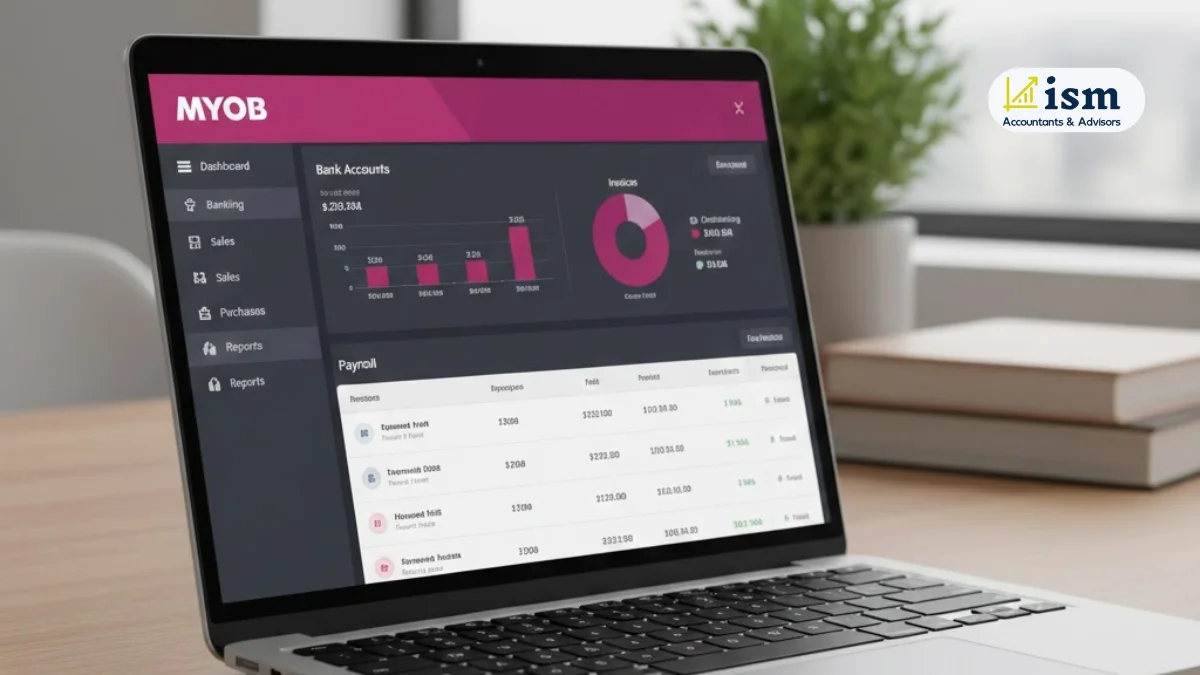
MYOB, or Mind Your Own Business, has been around in Australia since the 1980s. Yeah, it’s old school but still super reliable. It started as desktop-only, but now you can go full cloud, stick with desktop, or do a bit of both depending on what your business needs.
If you go with MYOB AccountRight, that’s the desktop-plus-cloud option. It’s handy if you’re moving from desktop to cloud because it gives you more control over accounting, payroll, and inventory. MYOB Business is fully cloud-based, updates automatically, and is aimed at small to medium businesses that just want things online without the hassle.
Core Strengths of MYOB
Payroll is where MYOB really shines. It’s got Single Touch Payroll, detailed GST and BAS reporting, and solid ATO integration so compliance doesn’t give you headaches. Inventory management is strong too, with multiple locations and suppliers covered.
And if you run more than one business, multi-entity management makes life easier. Financial reporting is solid for more complex setups as well.
Pros
- Strong Australian tax and compliance know-how
- Payroll included in most plans
- Great for handling multiple businesses
- Good inventory and stock tracking
- Flexible desktop and cloud options
Cons:
- Steeper learning curve with traditional accounting terms
- Fewer integrations, around 300 apps
- Interface isn’t as slick as Xero
- Features vary between desktop and cloud
- Less popular with accountants than Xero
Best Suited For
- Established Australian businesses with employees
- Companies with complex payroll or tax needs
- Businesses needing advanced inventory management
- Organisations managing multiple entities
- Users who like desktop accounting but want cloud flexibility
Summary
MYOB is solid if you want good compliance, accurate payroll, and control over accounting, especially if full cloud isn’t something you’re ready for yet.
Recommended Read: Nepali Accountants in Perth
What Is QuickBooks?
QuickBooks is made by Intuit and honestly, it’s everywhere when it comes to small business accounting. In Australia, QuickBooks Online is the one most people grab, perfect for small businesses, sole traders, and startups. The Desktop version has more bells and whistles, but it’s not really a thing here.
QuickBooks Online vs Desktop
QuickBooks Online (Cloud-based)
- Totally cloud-based, so updates happen automatically
- You can use it on any device as long as you’ve got internet
- Handy mobile app for sending invoices, tracking expenses, and checking reports
- Gives real-time access to your financials, super useful if you need to see things instantly
QuickBooks Desktop (Limited in Australia)
- Has more advanced features and you can customize more
- Installed on your computer, so getting in remotely isn’t super easy
- Not great for working together in real time compared to Online
Core Strengths of QuickBooks
QuickBooks is pretty cheap to start with and setting it up isn’t a headache, even if numbers aren’t your thing. It handles invoices and expenses smoothly, hooks up well with POS systems (retail and hospitality), works with online sales, and the mobile app makes managing money on the go really convenient.
Pros:
- Affordable for getting started
- Mobile app and online access are solid
- Works well with POS and e-commerce setups
- Easy to use, even if accounting isn’t your jam
- Perfect for sole traders and micro-businesses
Cons:
- Can lag or freeze sometimes
- Customer support isn’t always the fastest
- Not loads of Aussie-specific training out there
- Costs can climb if you need more users
- Only 8% of accountants actually prefer it
- Some features are missing compared to other platforms
Best Suited For
- Sole traders, freelancers, and startups
- Micro-businesses and small-scale operations
- Retail and hospitality businesses using POS
- E-commerce businesses with online sales
- Owners who want simple, budget-friendly accounting
Summary
Basically, QuickBooks is great if you want something simple, affordable, and works well with POS and e-commerce stuff. You don’t get all the extra fancy features that bigger software has, but for most small businesses, that’s actually a good thing.
Recommended Read: Business Accounting Services in Perth
Feature Comparision: Xero vs Quickbooks vs Myob
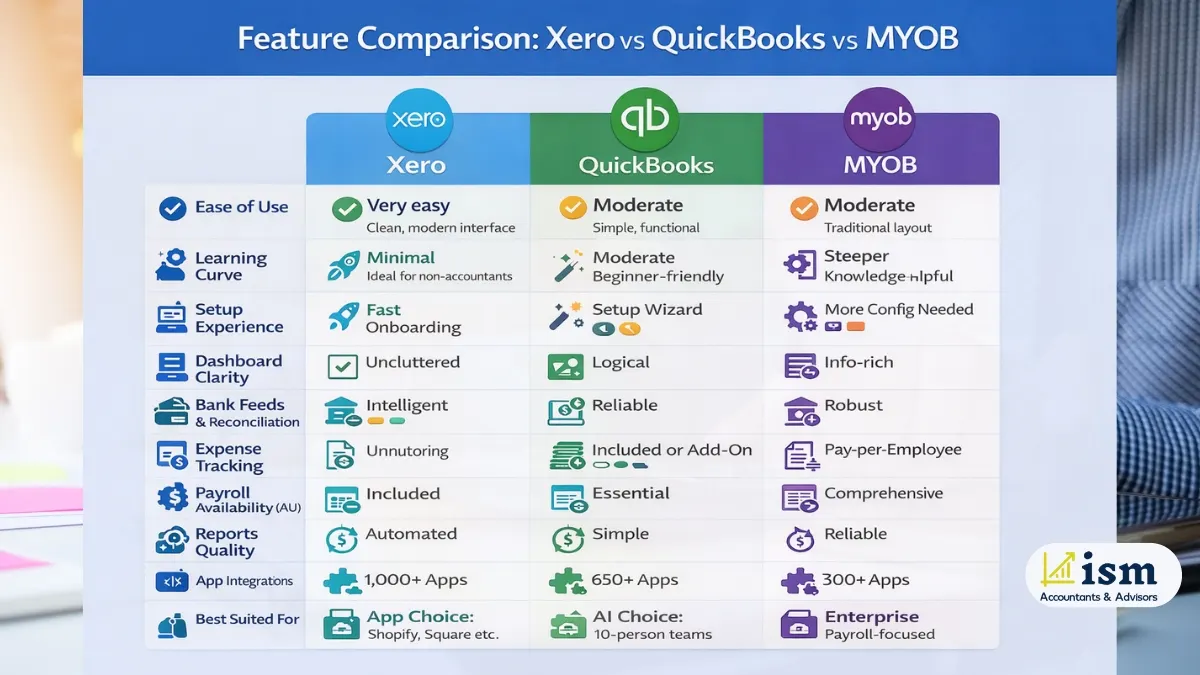
Category / Feature | Xero | MYOB | QuickBooks |
Ease of Use | Very easy; clean, modern interface with plain language | Moderate; traditional accounting layout | Easy; simple and functional |
Learning Curve | Minimal; ideal for non-accountants | Steeper; accounting knowledge helpful | Moderate; beginner-friendly |
Setup Experience | Guided workflows and fast onboarding | Requires more initial configuration | Setup wizard simplifies onboarding |
Dashboard Clarity | Clean and uncluttered | Information-rich but can feel cluttered | Logical but less polished |
Bank Feeds & Reconciliation | Intelligent matching with learning bank rules | Robust reconciliation with audit trails | Reliable bank feeds with receipt matching |
Expense Tracking | Unlimited projects and approvals | Mileage tracking and supplier bills | Simple expense tracking via mobile app |
Chart of Accounts | Highly customisable with tracking categories | Industry-specific and complex structures | Customisable but limited for advanced users |
Payroll Availability (AU) | Included in base plan (1–5 employees depending on plan) | Pay-per-employee, top-tier unlimited | Included or add-on (plan-dependent) |
Payroll Strength | Strong for growing teams; includes automated Payday Super compliance | Best-in-class for Australian payroll | Solid for small teams |
GST & BAS Reporting | Automated and easy to understand | Very detailed and audit-friendly | Standard GST & BAS reporting |
Single Touch Payroll (STP) | STP Phase 2 compliant | Seamless STP integration | STP Phase 2 compliant |
Invoice Customisation | Extensive branding and custom fields | Professional templates | Industry-specific templates |
Recurring Billing | Advanced automation and reminders | Reliable recurring invoicing | Simple recurring billing |
Online Payments | Stripe, PayPal, GoCardless | Integrated payment gateways | QuickBooks Payments + third-party |
Standard Reports | 60+ financial reports | Comprehensive incl. payroll & inventory | Essential financial reports |
Custom Reporting | Strong customisation and scheduling | Advanced filtering options | Basic customisation |
Cash Flow Forecasting | AI-powered (30–180 days) | Projections and trend analysis | Basic forecasting |
Third-Party Integrations | 800–1,000+ apps | 300+ integrations | 650+ integrations |
E-commerce & POS | Strong via app marketplace | Solid, inventory-focused | Excellent for retail & hospitality |
API Access | Very developer-friendly | Enterprise-focused API | Available but less flexible |
Mobile App Quality | Highly rated and feature-rich | Functional but basic | Most powerful mobile app |
On-the-Go Invoicing | Full invoice creation and management | Invoice creation supported | Excellent mobile invoicing |
Receipt Capture (OCR) | Built-in via Hubdoc, free | Reliable OCR | Best-in-class OCR accuracy |
User Limits | Strict caps: Ignite 1 user, Grow 5, Comprehensive 10 | Unlimited on Pro; Lite limited to 2 bank accounts | Tiered; additional users increase costs |
Best Suited For | App Choice: businesses using multiple apps like Shopify, Square, or complex integrations | Value Choice: 10-person office teams wanting flat-fee access | AI Choice: businesses leveraging Intuit Assist to automate bookkeeping |
February 2026 Verdict
- Xero “Gotcha”: For teams with 6+ users, Xero can become expensive because you must upgrade to higher-tier plans just for logins.
- MYOB “Value”: For established Australian offices with 10+ staff needing access, MYOB Business Pro gives the most cost-effective setup.
- QuickBooks “Speed”: Intuit Assist automates a lot of bookkeeping, perfect if you want minimal hands-on accounting.
Recommended Read: Can I Do Bookkeeping without Being BAS Agent?
Pricing Comparison: Xero vs MYOB vs QuickBooks
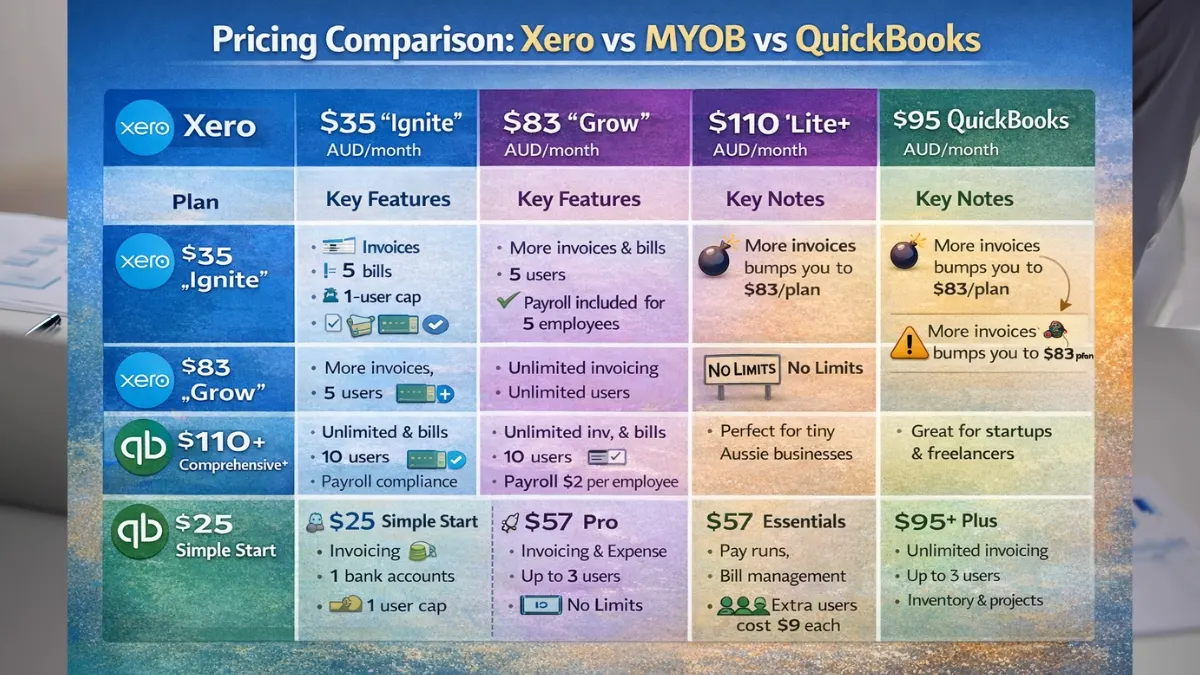
Alright, so when you look at Xero vs MYOB vs QuickBooks, the pricing game is kinda different for each. Xero sits more on the premium side, it’s packed with features and can handle unlimited users if you go higher up the plans, which makes it awesome for growing businesses.
MYOB, on the other hand, is really solid value for Aussie businesses, especially if you need payroll and inventory stuff, and their entry-level plans are pretty easy on the wallet. QuickBooks?
Honestly, it’s the easiest to get started with, perfect for startups and sole traders, though if you start adding more users or extras, the cost can creep up.
Software | Plan / Price (AUD/month) | Key Features / Limitations | Notes / Updates (Feb 2026) |
Xero | $35 “Ignite” | Max 20 invoices; max 5 bills; 1-user cap; payroll included for 5 employees by default | This is the most basic plan. If you send 21 invoices, boom—you’re automatically bumped to the $83 “Grow” plan. |
Xero | $83 “Grow” | More invoices & bills; payroll for 2 employees; 5-user cap | You need this one if Ignite isn’t enough. Extra users? That’ll be $5–$7/month each. |
Xero | $110+ “Comprehensive / Advanced” | Supports up to 5 payroll employees; up to 10 users; includes automated Payday Super compliance | Basically for bigger teams. Add-on users will cost around $5–$7 each. |
MYOB | $31 “Lite” | Entry-level plan; basic invoicing; limited to 2 bank accounts | Great if you’re flying solo or running a tiny biz. Just watch out for user and bank account limits. |
MYOB | $63 “Pro” | Unlimited users & invoices; payroll pay-per-employee ($2/month) | This is where you get the best bang for mid-sized Aussie teams. No more caps on users or bank accounts. |
Recommended Read: Accounting Service for Creative Professionals
Which Accounting Software Should You Use?
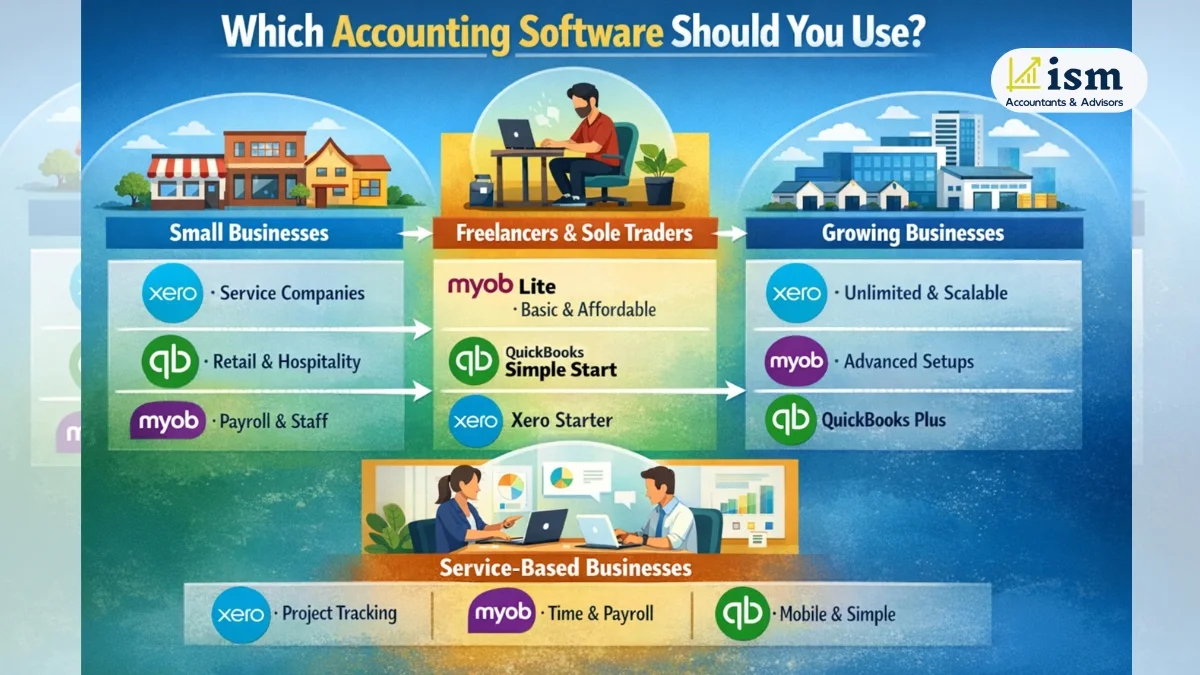
Picking the right accounting software really comes down to your business size, what industry you’re in, and where you want to go in the future. Here’s a quick, no-fluff guide:
- Small Businesses
- Xero: Perfect for service businesses like consultants or agencies. Flexible invoicing, project tracking, and team collaboration make life easier.
- QuickBooks: Great for retail or hospitality. The POS integration and mobile monitoring are super handy when you’re on the move.
- MYOB: Best if you’ve got a bunch of employees. Payroll’s included and it keeps you compliant with Aussie rules.
- Freelancers & Sole Traders
- MYOB Solo/Lite: Super basic but does the job—handles invoicing, expense tracking, and BAS prep. Plus, it’s the cheapest option.
- QuickBooks Simple Start: Mobile-friendly and easy if you sell online or provide small services.
- Xero Starter: Good for freelancers who are starting to grow and need things like CRM or project integrations.
- Growing & Established Businesses
- Xero: Scaling companies love this one. Unlimited users, AI cash flow forecasting, and tons of integrations.
- MYOB: Works well for complex setups, multi-location teams, or inventory-heavy businesses. The hybrid desktop-cloud option is nice.
- QuickBooks Plus: Fits small growing teams (up to 5 users). Just keep an eye on the user limits so you don’t get surprised.
- Service-Based Businesses
- Xero: Agencies and consultancies dig this one. You can track profitability by project or client, and it hooks up with all your workflow tools.
- MYOB: Good for service businesses that need payroll and time billing.
QuickBooks: Small service teams will like it. Simple time tracking and the mobile app make life easy.
Recommended Read: How to Reduce Taxable Income?
Final Verdict: Xero vs MYOB vs QuickBooks
Honestly, picking the right accounting software comes down to your business size, what you actually need, and what matters most to you. Here’s the lowdown:
Choose Xero if you:
- Like things that are easy to use with a modern, intuitive interface
- Need tons of third-party integrations
- Want unlimited users (just keep plan limits in mind)
- Work closely with an accountant (they mostly prefer Xero anyway)
- Care about real-time collaboration and cloud-first features
- Want AI-powered cash flow forecasting to help you plan ahead
Choose MYOB if you:
- Have employees and complex payroll stuff to handle
- Need advanced inventory management across multiple locations
- Run multiple business entities
- Prefer payroll included instead of paying for add-ons
- Want strong Aussie compliance support
- Are moving from older desktop accounting software
Choose QuickBooks if you:
- Are a sole trader or micro-business looking for something affordable
- Run retail or hospitality businesses with POS systems
- Work mainly on your phone or tablet
- Sell a lot online and need e-commerce support
- Want basic accounting without a bunch of extra clutter
- Love having a world-class mobile app at your fingertips
Bottom Line
- Xero: Great for small-to-mid-size businesses thanks to usability, integrations, and the fact that accountants mostly like it.
- MYOB: Shines for businesses that need complex Aussie compliance, payroll, or inventory features.
- QuickBooks: Perfect for freelancers, startups, or small businesses in retail, hospitality, or e-commerce.
All three have free trials, so honestly, it’s worth testing your top pick. And of course, it’s always a smart move to chat with your accountant or bookkeeper to make sure it fits your business. If you want a bit of expert guidance, ISM Accountants can help you figure it out.
Frequently Asked Questions (FAQ)
Honestly, Xero is the most popular in Australia—around 55% of accountants prefer it. It’s great for service-based businesses and teams that need to collaborate in real time. MYOB is better if you’ve got employees and need strong payroll and inventory management. QuickBooks is more budget-friendly, so it works well for sole traders and startups.
For most small businesses, Xero usually wins thanks to its easy interface, unlimited users (on higher plans), and loads of integrations. QuickBooks is handy for retail or hospitality businesses that use POS systems. MYOB makes sense if your business has staff and you need payroll and inventory features.
If you’re looking to save, MYOB Solo/Lite is the cheapest at about $11/month—perfect for freelancers. QuickBooks Simple Start is around $29/month, and Xero Starter is roughly $35/month. They cost a bit more but come with extras like mobile access and integrations.
Not by default. Xero Payroll is an add-on at around $10/month per employee and it fully covers Australian awards, leave, super, and Single Touch Payroll. MYOB generally includes payroll in most plans, while QuickBooks gives it as an optional extra.
Yep! Usually, it’s just a matter of exporting your data, importing it into the new system, and reconciling accounts. Most businesses get an accountant or bookkeeper to help, especially if you’re switching at the start of a financial year—it makes things way smoother.
Xero wins for simplicity—clean, jargon-free, easy to pick up. QuickBooks is fairly straightforward too. MYOB can take a bit longer to get the hang of, mainly because of the old-school accounting terms.
Yes. Xero, MYOB, and QuickBooks all handle GST and BAS reporting. MYOB probably has the most detailed BAS tools, but Xero and QuickBooks cover all the compliance stuff you need.
QuickBooks takes the crown here—its app lets you invoice, track expenses, snap receipts, and check reports easily. Xero’s app is also solid, and MYOB’s app covers the basics.
Totally. QuickBooks Simple Start at about $29/month works well if you just need basic invoicing, expense tracking, and GST/BAS compliance. MYOB Solo/Lite is cheaper if you’re keeping things super simple, while Xero scales better if your freelance business is growing.
Yep. All three give 30-day free trials so you can test things like invoicing, bank feeds, and reporting before committing. And if you want, accountants can even give demos to help you pick the best fit.